Create instant wholesale quotes with volume-based pricing
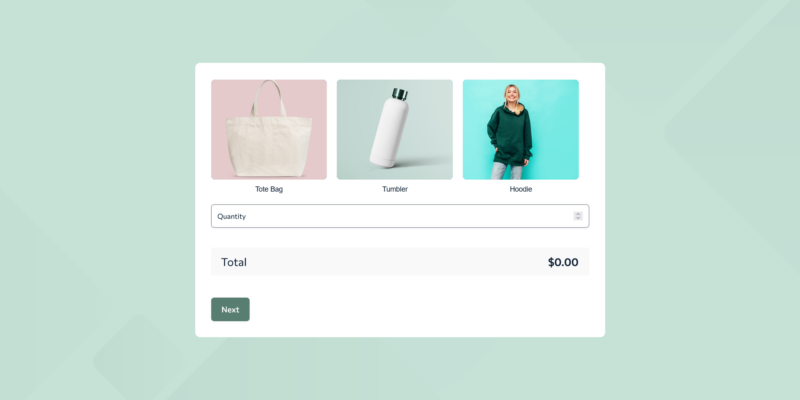
Make it easier for customers to estimate the cost of a wholesale or bulk order without waiting for a manual quote. This customizable calculator lets buyers select a product, enter the required quantity, and see an estimated unit price, discount, and order total instantly.
Use it for wholesale products, promotional merchandise, custom printing, corporate gifts, packaging, manufacturing, supplies, or any business that offers quantity-based pricing. Clearly showing how prices change at different order volumes can also help customers compare options and choose the quantity that offers the best value.
The template can be adapted to match your pricing model. Change the included products, quantity ranges, unit prices, discount tiers, taxes, setup fees, shipping costs, or any other values used in the calculation. You can also add product variations, optional services, file uploads, delivery preferences, or additional questions needed to prepare an accurate quote.
Use the calculator as a simple quote request form, collect deposits or full payments, or connect it to a longer sales process. Customize the design and branding, send automatic email notifications, redirect customers to a custom confirmation page, and manage every submitted request from your Woorise dashboard.
How it works
Use this ready-made and simple calculator as a starting point, then customize the products, pricing, fields, design, and submission flow for your business.
- Start with this template
Add the Wholesale Bulk Pricing Calculator template to your Woorise account. - Customize the products and pricing
Replace the example products with your own and update the quantities, unit prices, discount tiers, fees, taxes, and calculation formulas. - Add the fields you need
Collect customer details, company information, delivery preferences, product options, notes, or file uploads. - Adjust the layout and design
Keep it as a single-page form or turn it into a multi-step form, then customize the colors, fonts, buttons, images, and branding. - Configure the submission flow
Show a confirmation message, redirect customers to another page, notify your team, connect integrations, or accept a deposit or full payment. - Publish and share
Use the calculator as a standalone Woorise page or embed it on your website.
Key template features
- Advanced calculation engine: Dynamically shifts unit pricing based on real-time quantity triggers.
- Integrated payment gateways: Accept secure B2B payments instantly through native integrations with Stripe, PayPal, and other leading providers.
- Personalized thank you pages and email notifications: Deliver custom confirmation screens to buyers instantly and trigger tailored automated emails to your team or your customers.
- Conditional logic built-in: Show or hide fields (like specific customization options or shipping fields) based on previous user selections.
- Flexible page layouts: Deploy it as a quick, high-impact single-page form, or turn it into a guided multi-step questionnaire for complex orders.
- 100% brandable design: Fully customize fonts, button styles, colors, and fields using a visual drag-and-drop builder to match your website flawlessly.
Frequently asked questions
You can build quantity-based pricing, tiered discounts, product-specific rates, fixed package prices, or a combination of these. The calculator can also include minimum order quantities, setup fees, optional services, shipping, taxes, and other charges that affect the final price.
Yes. You can edit the calculations to include quantity-based unit pricing, percentage discounts, fixed fees, setup costs, printing, packaging, shipping, taxes, optional add-ons, deposits, or any other values used in your wholesale pricing.
Yes. The calculator can display an estimated unit price and order total as customers change the quantity or selected options. You can also use it only to collect quote requests when final pricing needs to be reviewed by your team.
You can use the template as a request-a-quote form, collect a fixed or percentage-based deposit, or accept the full calculated amount through a supported payment provider such as Stripe or PayPal. This lets you adapt it to both manual wholesale quotes and direct bulk orders.
Yes. You can add more products, options, and questions as needed, then use conditional logic to keep the form relevant to each customer. For longer orders, you can split the form into multiple pages and add page names and a progress indicator.
The submission is saved in your Woorise account, where you can review the customer details, selected products, quantities and calculated totals. You can notify your team, show a custom confirmation message, redirect customers to another page, or send the submitted data to supported integrations.
Yes. You can customize the colors, fonts, buttons, images, logo, text, spacing, and page layout to match your branding. Publish it as a standalone Woorise page or embed it directly on your existing website.